Chemistry Add-In for Microsoft Word

CML is Cool

  • Home
  • History
  • Download
  • Consultancy
  • Sponsors
  • Under the Hood
  • News
  • Organomicom
  • Shop
    • My account
    • Basket
  • Support ▾
    • Knowledge Base
    • Usage
    • FAQs
    • Tutorials

Under the Hood: 1- Modelling Chemistry

12th October 2022 by Clyde Davies

This is the first in (what I hope will be) a series of occasional postings.  Targeted at developers mainly, these will cover some of the problems we come across, and how we solve them.

Chem4Word is about ten years old.  It started out as a research project.  Such projects typically explore new ways of solving problems.  They don’t set out to optimize established approaches.  When you keep adding new functions at the expense of making existing ones work better, you end up with cruft.

The cruftiest portion of Chem4Word was its in-memory chemistry handling.  Chem4Word’s standard file format is Chemical Markup Language, an XML dialect. There was no logical differentiation between the file containing the information and its in-memory representation.  The code simply loaded the CML as-is into an XDocument.  It then manipulated the XML directly.  This was very wasteful as it required the XML parsed every time we needed to manipulate something.  XDocuments are fine for limited XML editing, but when you’re constantly hitting the document then the conversion overhead becomes huge.
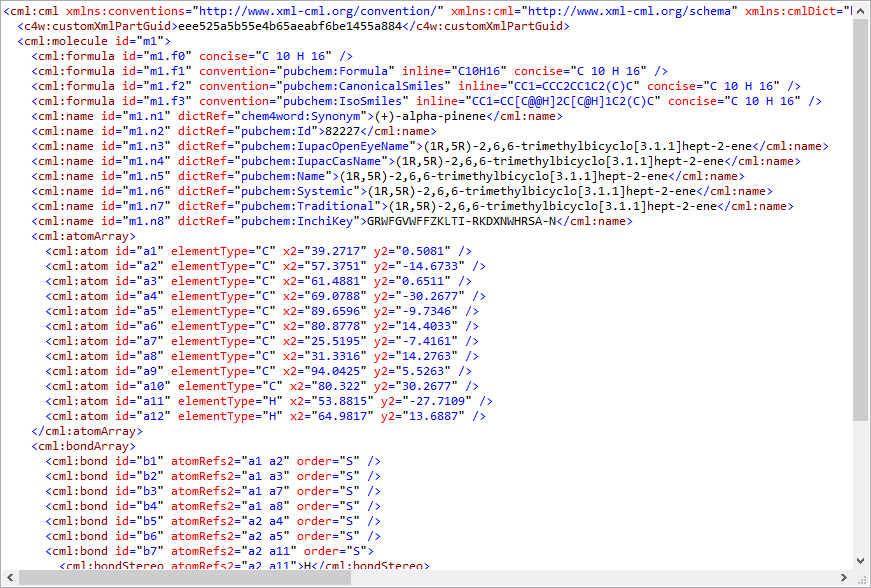
Some CML for a simple molecule!

So, we wrote a completely new, in-memory Model class in C#. The Model in essence represents a chemical drawing.   A Model contains Molecules,  which can contain other Molecule objects or Atom and Bond collections.

Atoms obviously are the building blocks of Molecules.  We store these in Molecules as dictionaries.  These allow us to quickly retrieve an Atom by its label, such as ‘a1’.  Bonds are simple collections, which reference a StartAtom and EndAtom  as a text label.  So Bond ‘b1’ would link Atoms ‘a1’ and ‘a2’, for example.

Atoms obviously have to reference a specific Element. There are obviously a limited number of these, stored in a single global PeriodicTable.

Each Molecule also contains what we term as emergent objects.  So, a Molecule has a collection of Rings, and each Ring collects several Atoms.   Atoms can be shared by more than one ring.

This simple approach allows us to create compact in-memory representations of quite complex molecules.  The XML representation, instead of being central, is now relegated purely to persistence roles.  Previewing, in-document rendering, editing and many other functions now work on the  Model.  A dedicated CMLConverter class handles conversion to and from the CML format, typically when storing this in a Custom XML Part.

No doubt some purists will take issue with this rather literal implementation but we (and you) are already reaping the benefits.   The improved performance is by far the most dramatic effect.  Even on a relatively fast machine, rendering insulin in the document used to take six or seven minutes.  Now it takes a few seconds.  We have seen performance improvements of 400-500% on small molecules and 12,000% on large ones!

One final benefit comes from exposing the atoms and bonds as objects in their own right, and organizing them as collections.  We can now data-bind to them.  Windows Presentation Foundation makes heavy use of data binding.  So, we could theoretically data-bind various visual elements to their corresponding logical ones.  And this is precisely what we do in the FlexDisplay component, which we will cover in a later post.
Filed Under: News, Under the Hood

All New for 2022: Chem4Word does Chemical Reactions!

15th March 2022 by Clyde Davies

We’ve Been Busy!

2021 was a challenging year for many of us. We are still glad that we managed to produce a new release of Chem4Word. The most effort went into improving ACME, our new molecule sketcher.

ACME opens new horizons for Chem4Word. And I’d like to talk about some of those now.

Reactions

Chemistry is the study of change, as Walter White memorably points out.

Chem4Word up to now has been more concerned with static molecules. We think it presents these as well as any paid-for package.

But molecules are boring, yeah? You got enthused when you saw some chemistry happening! You have been demanding change. And we’re going to deliver it!

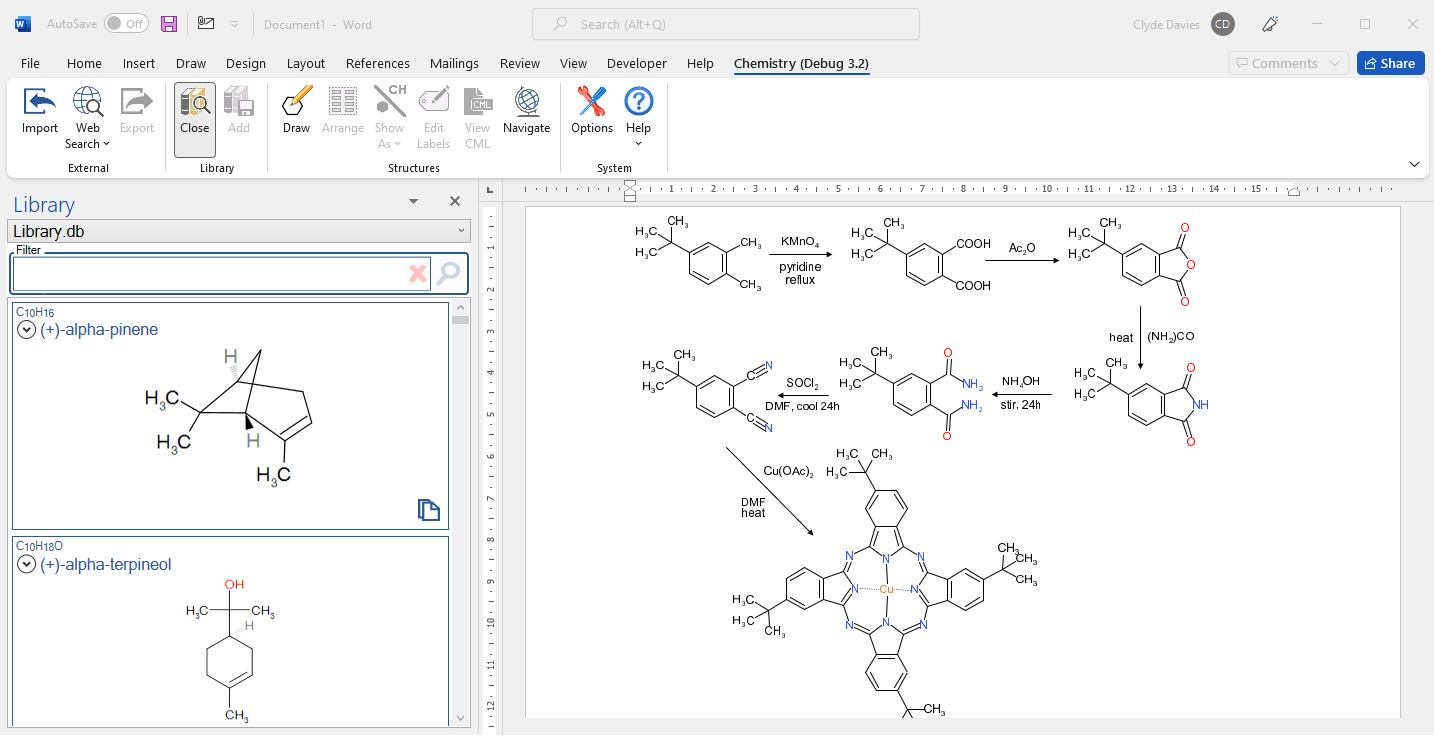
We’ve been working on basic reaction functionality. What’s that? Well, it’s drawing different kinds of chemical reactions and specifying reactants, products, reaction type with reagents and conditions. Here’s a sneak preview:

But Chemical Markup Language, which underpins Chem4Word, is capable of much, much more. CML describes reactions in great detail using CML-React. You can fully specify the reaction type, reagents and conditions. You can also set reactants and products for a reaction.

Semantic Reagents

We want to treat reagents and solvents as first-class chemical objects in their own right. So, we will add custom dictionaries of these, both from libraries and from online sources like Wikipedia.

Electron Pushing

We also plan to fully support reaction mechanisms with electron pushers (‘curly arrows’). Chem4Word will be the best free chemistry tool for teaching and understanding chemistry!

How You Can Help

We are now beta-testing this new version, so get involved if you can. Download the beta and tell us what you think. All your feedback is valuable!

Clyde Davies
Project Leader.

Filed Under: News Tagged With: chemical reactions; semantic chemistry; chem4word

Chem4Word in Office Online

8th September 2020 by Clyde Davies

What is Office Online?

You often ask us, ‘why doesn’t Chem4Word work in Office Online apps?’  After all, you would be able to use it on any platform that supported them. Such as Apple Mac, used by many chemists in preference to Windows.

A Bit of History

The answer is complicated and lies in the history of Chem4Word.  It started collaborative project between Microsoft Research and Cambridge University more than ten years ago.  If you wanted to develop a Word add-in at that time,  you had two options. 

First, you could write it in Visual Basic for Applications.  This is great for quick, relatively unsophisticated customisations, such as custom templates or dialog boxes.

But Chem4Word demanded a lot more from the platform. So it used Visual Studio Tools for Office (VSTO).  VSTO, pronounced ‘visto’, ties Word and other Office apps into the .NET Framework using the C# programming language.  This unleashes the full power of Windows, including sophisticated graphics and XML handling. This is just what was needed to power Chem4Word.   

The Present

A lot has changed since it was first written.  Microsoft sank more resources into developing the cloud-based versions of Office and now embraces JavaScript as a development language.  It’s bringing its online APIs into line with the VSTO-supported APIs. There will soon be little to choose from them.

But, and this is a very big ‘but’: JavaScript is a very different language to C#.  Despite being ‘the programming language of the Web’, it is arguably a poor relation and does things very differently.  Translating our tens of thousands of lines of code from C# to JavaScript is a huge task!  JavaScript’s graphics capabilities come second to the native Windows platform. For instance, ACME would be difficult to reproduce using the HTML canvas:

Ecce ACME!

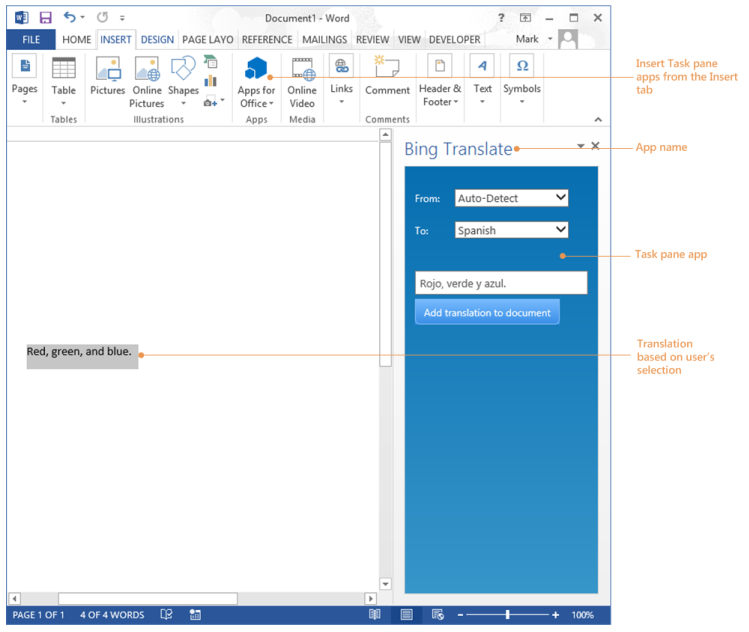
The Office Online development platform is also limited. We can’t easily access compound libraries downloaded to the computer.  The security restrictions of running in a web browser put paid to that, and other features! Office Online add-ins can only interact with the user through task panes. It’s difficult to shoehorn all our functionality into those.

A brief Overview of Office Add-ins | by Peter Wasonga Ombwa | Medium
A task pane in action

What Now?

Microsoft have pledged continued support for VSTO-based applications. So, for now we will dedicate our development resources to enhancing Chem4Word on this platform.  Our new ACME editor will allow us to add exciting new features, like reactions and structural templates, while maintaining the full Chem4Word experience that you know and value. 

We will still be closely watching how the new Office Developer story unfolds.  When we are happy that we can take what we have done to the new online platform, with minimal effort, hassle and degradation of functionality, then we will provide a Chem4Word that’s as fully-featured and easy to use online as it is on your desktop!

As a final comment, with the web version of Word, you can open, read and edit documents containing Chemistry that were created with the desktop version of Word without losing the Chemistry components.

Filed Under: News

ACME In Chem4Word

29th August 2020 by Clyde Davies

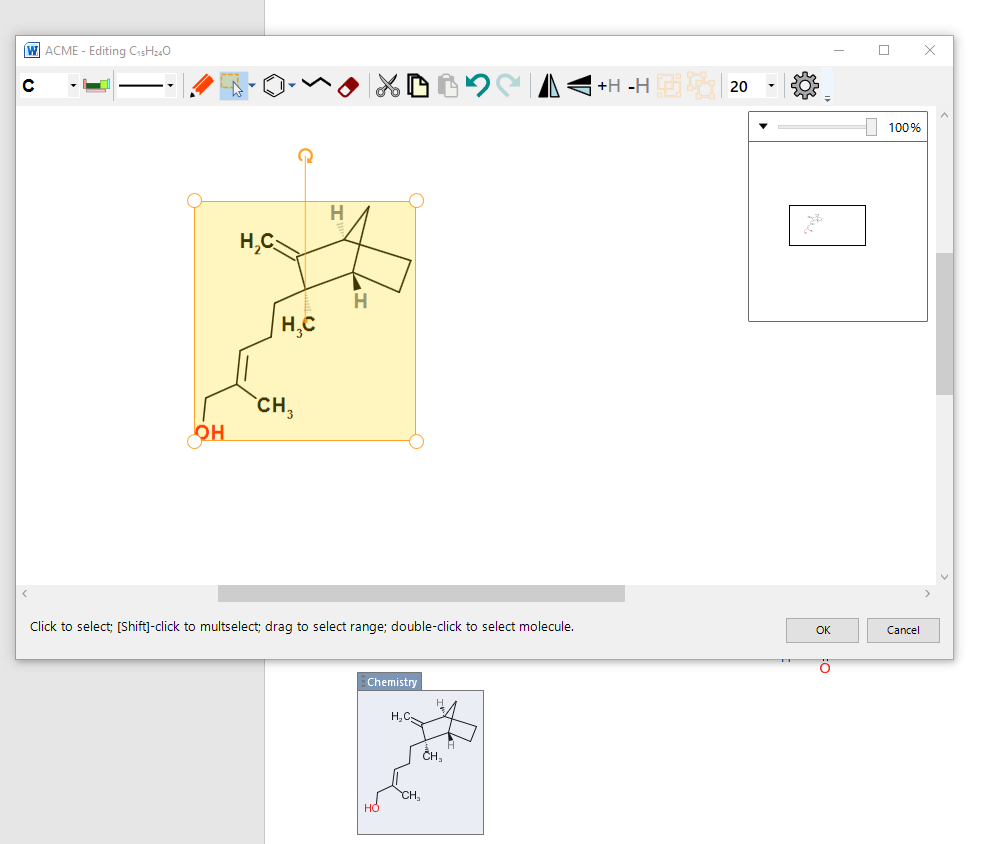
The new version will allow you to use our brand new, intuitive Chemistry editor (ACME). 

Have a guess to see what ACME stands for. 

W ACME - Editing C,sHuO 
20 
100% 
CH3 
Click to select; [Shift-click to multselect; drag to select range; double-click to select molecule. 
Chemistry

Filed Under: News

What’s coming up in Version 3 – A user perspective

3rd April 2017 by Clyde Davies

A completely new version of Chem4Word

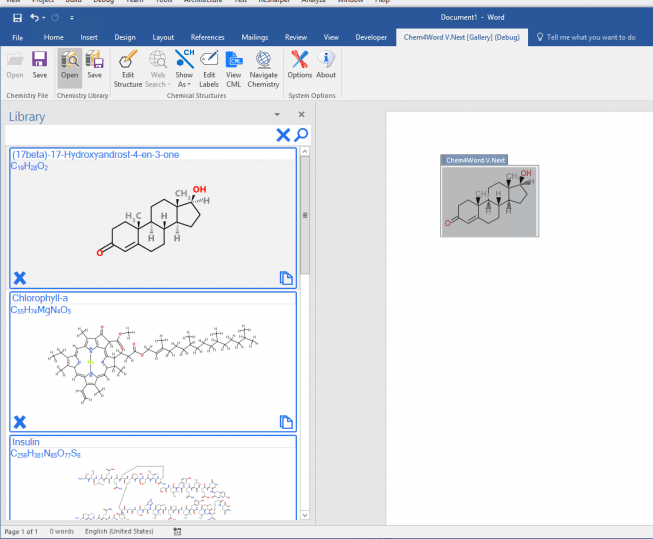
We have been working on a new version of the Chemistry addin for Microsoft Word and we’d like to show our progress so far.  The new Ribbon and Library are shown in the picture below.  We also have a new version of the Chemistry Navigator and a replacement for the old Gallery, now called the Library.

Why a completely new version?

We decided it was time to take stock.  It’s about ten years since Chem4Word was first released.  A lot has happened since then, and we wanted to make sure we could meet both present and future challenges.

What has been our approach?

We had a long discussion among the team about what direction we should take after we released the last version.  We came up with two possibilities:

  1. Enhance performance: make the product more reliable and stable, and re-write some of the code to allow it to be properly extendable.
  2.  Concentrate on providing new features

We could have followed both of these approaches  But it made more sense to put the product on a firmer footing before we built anything new onto it.

What did we do?

So, what have we done to improve the product?  Well the first thing we did was to listen to your feedback and address some longstanding gripes.

You complained about the idiosyncratic ways that Chem4Word stored its stuff in a Word document template.  So we dealt with those issues first.  Then we went on to address performance problems.  We also had some issues with the way that the Gallery and Navigator displayed structures as low-quality pictures.

You should find the new version of Chem4Word familiar. Most of the old features are still there.  We’ve just made them work much better!  And we’ve got rid of those you didn’t like or didn’t use.

Better Storage means Better Editing and Better Performance!

Our first step was to change the way that the chemistry information is stored inside the Word document, before it is presented to you in the form of a structure/label or formula in the document.  A radical change to the storage model means that you can now copy and paste structures inside a document and even between documents.

We also addressed the performance of the code that generates the structures that you see in your documents.  By changing the way the add-in works with the chemistry information in the document, we have made it very much quicker to render more complex structures with larger numbers of atoms and bonds.  To give you an idea of the speed improvement, have a look at this video that compares the performance of the current add-in with the version currently in development.

FlexDisplay

Because it’s now much easier and quicker to work with the chemistry directly, this opens up all sorts of exciting new possibilities.  On-screen rendering is now much easier than it was, so we don’t have to rely on storing the low quality bitmaps of the structure for the Gallery and Navigator tools.

We have used this new tool, the FlexDisplay in the new Navigator and the new Library to get high quality display of chemical structures in these two tools.

New Navigator

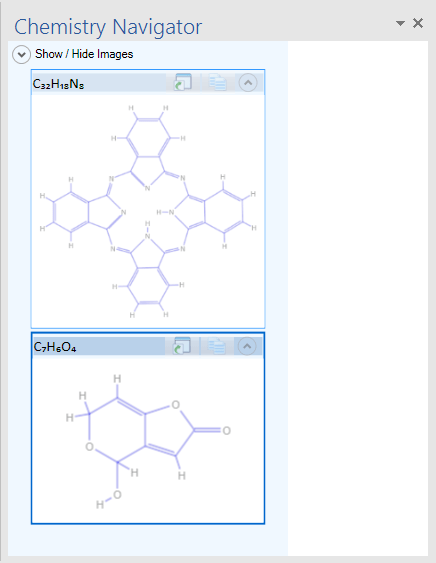
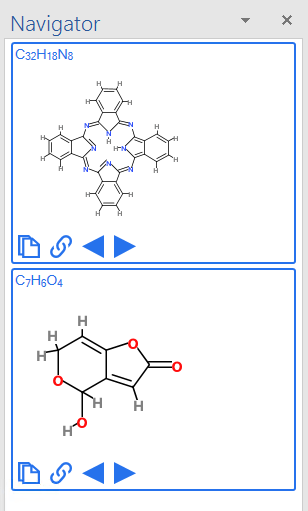
We completely overhauled the Navigator.  This lists all the chemistry in the current document, and allowing you to paste copies and links to embedded chemistry.  The new version does much the same as the old one.  It also includes new Browse buttons.  These allow you to locate and show all the instances of a given chemical within the document.


Old Navigator New Navigator

As you can see, it follows the new-look Office style.  It also uses the FlexDisplay to display chemistry, making the display much clearer (and quicker).  See how much clearer  and more colourful the structures are compared to the old-style Navigator.

Goodbye Gallery – Hello Library!

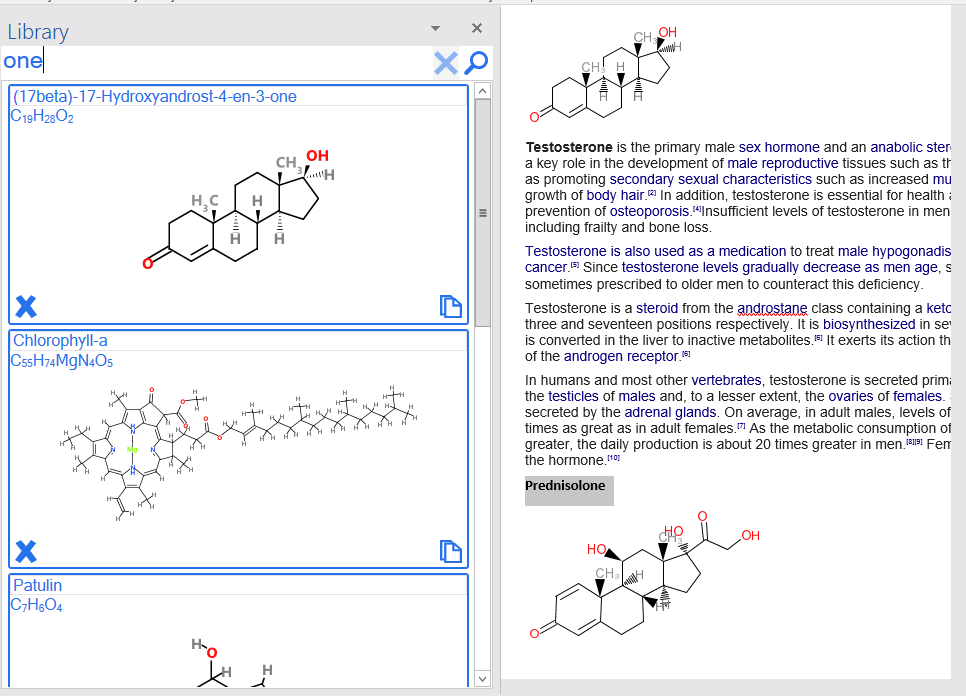
The Library in Action

One of the biggest gripes you had about the way Chemistry for Word worked was that it replaced the document’s template with it’s own version, thus eliminating any styles and other customizations you had done.

You hated this, so we have completely removed the Gallery and replaced it with a new component: the Library.  The Library superficially resembles the Gallery, but as you can see above it lives in its own task pane, flanking the document along with the Navigator.  You can save structures to the Library, change their names, and insert them wherever you want to in your document.  This is handy when you are constantly referring back to a core set of structures, say, when preparing teaching materials.

Best of all, the Library doesn’t use any templates to store its structures, so you won’t lose any document customizations that you have already made.

We hope you like the look of the changes that we’ve made and we expect to be able to release a version for you to try very soon.

Filed Under: News Tagged With: Depiction, FlexDisplay, Gallery, Library, Navigator, New Version

  • « Previous Page
  • 1
  • 2
  • 3
  • Next Page »

Recent Posts

  • Organic Named Reactions – The Organomicon
  • Made Our Century – But Still In The Crease!
  • Available NOW: Improvements to Reactions!
  • Chem4Word – V3.3.10 Release 8
  • Why Should I Use Chem4Word?

Archives

  • August 2026
  • July 2026
  • June 2026
  • February 2025
  • July 2023
  • June 2023
  • March 2023
  • December 2022
  • November 2022
  • October 2022
  • March 2022
  • September 2020
  • August 2020
  • December 2018
  • April 2017
  • January 2017
  • December 2016
  • September 2016
  • December 2015
  • Privacy Policy – Chemistry Add-In for Microsoft Word
  • About Us
  • Contact Us
  • Cookie Policy (UK)

Copyright © 2026 · "Supported by the .NET Foundation" · Log in

Manage Consent
To provide the best experiences, we use technologies like cookies to store and/or access device information. Consenting to these technologies will allow us to process data such as browsing behaviour or unique IDs on this site. Not consenting or withdrawing consent, may adversely affect certain features and functions.
Functional Always active
The technical storage or access is strictly necessary for the legitimate purpose of enabling the use of a specific service explicitly requested by the subscriber or user, or for the sole purpose of carrying out the transmission of a communication over an electronic communications network.
Preferences
The technical storage or access is necessary for the legitimate purpose of storing preferences that are not requested by the subscriber or user.
Statistics
The technical storage or access that is used exclusively for statistical purposes. The technical storage or access that is used exclusively for anonymous statistical purposes. Without a subpoena, voluntary compliance on the part of your Internet Service Provider, or additional records from a third party, information stored or retrieved for this purpose alone cannot usually be used to identify you.
Marketing
The technical storage or access is required to create user profiles to send advertising, or to track the user on a website or across several websites for similar marketing purposes.
  • Manage options
  • Manage services
  • Manage {vendor_count} vendors
  • Read more about these purposes
View preferences
  • {title}
  • {title}
  • {title}